Showing posts with label linux. Show all posts

Thursday, October 1, 2026

A "Hardware" USB Midi Host from a Raspberry Pi Zero

 Believe it or not, I do still exist. And I do some projects still.
Sometimes.

Anyway, I've been starting to play more with hardware synths because I don't have  a dedicated studio space right now to set up softsynths and I just want to play around without messing with computers and wiring everything up. Regardless of the reason I wanted to be able to connect my KMI kboard up to my Korg Volca FM or my just arrived AMYboard but to do so requires a USB Midi Host. There are devices for sale that do this, but I realized that I have a device in a box that will do this already.

 So I dug out my raspberry pi zero W and a new project was born.

Tuesday, October 24, 2023

Markdown to PDF with Pandoc on Ubuntu 20.04

I've been ok on the LTS ubuntu for my daily driver for quite a while. But today I'm frustrated yet again I cannot export a wiki page from github to PDF. Maybe it's fine on newer versions. Todays issue of the day was:

 Error producing PDF.
! LaTeX Error: File `pdftexcmds.sty' not found.


Fixing it depends on how you installed latex. I installed texlive-base and a couple other packages. You'll find many refrences through your search engine of using the tlmgr utility to install the missing packaged. You shouldn't do that though unless you used that for your tex installation, which I didn't; I used apt. So I must figure out what apt package has that file. To fix this particular one I just needed:

 sudo apt-get install texlive-latex-recommended

Ok so one down. How many more to go?

 Error producing PDF.
! LaTeX Error: File `letltxmacro.sty' not found.


 ...

 [sounds of googling]

...


 sudo apt-get install texlive-latex-extra


Success. 2 deep isn't too bad. Hope this helps. Good luck!

Thursday, June 23, 2016

Room Treatment and Open Source Room Evaluation

Its hard to improve something you can't measure.

My studio space is much much too reverberant. This is not surprising since its a basement room with laminate flooring and virtually no soft, absorbant surfaces at all. I planned to add acoustic treatment from the get go, but funding made me wait until now. I've been recording doing DI guitars, drum samples, and synth programming, but nothing acoustic yet until the room gets tamed a little bit.

Friday, November 6, 2015

Easyish Triple Boot on a Macbook Pro, Round 2

So my "easyish" install using Wubi finally crashed when I was trying to change things and install Ubuntu 15.10. If I'd have left it at 14.04, it probably would have been ok for a long time. However I was getting tired of the poor disk performance when creating large archives for work. So once it was broken, I had no reason not to just try and get a full triple boot (luckily I had backed everything up before trying anything). I found this recent article about triple booting, but its process has the deal-breaking requirement to install ubuntu before windows. What if you're handed a machine already set up for dual boot (without the recovery disks, mind you)? Funny that with 2 operating systems to choose from I wasn't happy with either....

Well it can be done (at least on my MBP 11,3 with yosemite and a windows7 bootcamp partition), and the secret sauce is rEFInd. I don't understand EFI at all. And every time I start going through the docs (rEFInd has a lot of GREAT documentation) I get distracted with needing to do work or something. Anyhow, before, I couldn't boot any Ubuntu live usb drives after 14.10 (I think the switch to systemd maybe?) but once I installed rEFInd I could... When I resized the bootcamp partition using a 14.04 live usb, booting windows didn't work any more. But once I installed rEFInd it did... After installing 15.10 from the liveUSB I couldn't boot osx or windows from the grub bootloader. But once I held the option key and used apple's boot selector to boot into OSX again and installed rEFInd again I could... boot from rEFInd's boot selector that is. Somehow rEFInd is magical.

So in a recipie:
  1. Boot a live usb (I had to use 14.04)
  2. Use gparted to shrink down the bootcamp/windows partition (make sure you've defragmented the partition in windows first).
  3. Install rEFInd by downloading in OSX and running the install.sh from the OSX terminal
  4. Boot  windows just to make sure you still can (when you have to)
  5. Boot from a live usb of ubuntu 15.10 and install with the empty space turned into the / directory (root)
  6. After the ubuntu install hold option next time you boot and boot into OSX, install rEFInd again (the grub configuration messes it up somehow)
  7. Enjoy using linux but still having 2 other operating systems to choose from (though you'll have to twist my arm to get me to boot anything other than linux).
Hopefully this helps. Its not as detailed as my last post, but I'm much more satisfied with the results so far. I'm still amazed that a free and open source project does boot management so much better than the expensive proprietary options.

Oh ya, and do all this at your own risk. Please make backups.

Wednesday, June 10, 2015

Using LV2 atom:Path (or how to get files safely in a plugin without a GUI)

The end of last month marked 2 years since my initial commit to my first lv2 plugins. I've learned some things, but still am picking up more little by little. I was recently reminded that I don't know it all, when falkTX pointed out another stupid mistake I'd been making that prevented my GUIs from resizing correctly.

Water under the bridge though. I'm going to try to explain out how to use lv2 to have the host make a file selection dialog for you. I want all my plugins to work purely with host generated GUIs and loading files became necessary for porting the rakarrack *tron effects. The LV2 official documentation has improved a lot, but I was still struggling, so I thought I'd post this. The example to be used is rakarrack's reverbtron. Its a sort of convolution using very simplified impulse response files (which are actually text files). Instead of a constant sample rate in the IR, you just keep the most important samples and interpolate between them.

Regardless of the details, I have a module that needs files. All I need is to pass the file's path to the modules setfile() function and it takes care of the rest. How do I get that path? The whole process involves several extensions, and the most confusing part to me was figuring out what was what. But I got it, so read on...


Thursday, June 4, 2015

How to Boycott SourceForge

I was finally convinced to leave Sourceforge.net. I was holding out, trying to be true to a service that once was the best and most dedicated to free license and open source software, but finally, due largely to this editorial, have decided to join the boycott. Since I don't like doing things half-way I'm taking everything down and trying to make it as easy as possible for others to do the same.

If you are using git already, it won't take much to move your repositories to Github. Bitbucket will pretty much be the same commands. I already had an account so I won't describe how to sign up, but its pretty easy. Once signed in you can create a repository by clicking the little plus sign in the top right corner. Name the repo whatever your project name is and opt to leave it empty (I presume you already have the project hosted at sf.net). You should make sure you're up to date on every branch from sf.net first. Once that is done you can just go to your local repo and issue the command:

git push https://github.com/[USERNAME]/[PROJECTNAME].git master

and repeat for every branch besides master.

You can then delete the local repo and re-clone it using the URL github give you, or just edit .git/config to update what URL origin points to, or there's some git command to do it that I can't remember. You can also go delete your project from sf.net BUT I decided to leave the skeleton of the project with links to the new home at github.

To do so make sure you haven't pointed your repo's origin to github yet. If you have substitute the sf.net project git URL for origin. Go delete every branch but master on sf.net by entering:

 git push origin :branch

Then on master branch do (carefully):

rm -rf *
echo moved to [github project URL] to boycott sourceforge >> README
git commit -a -m "boycott sourceforge"
git push origin master


Careful, because rm -rf * deletes everything in the current directory. This makes it so your repository is now empty except a nice little statement of what we think of the new sf.net.

I only had source tarballs in the files section so I deleted them all and added the same readme as is in the repo. If you use this feature of sf.net it will be harder to find a substitute. This blogger subjectively goes through 14 alternatives and decides to stick with sourceforge. Hopefully you can find one of the alternatives workable.  I also edited the project description to say that the project had moved.

 If your project has a website you can move it to github quite easily too. Just go to your repo that is now using github for the origin and type:

git checkout -b gh-pages
rm -rf *


The name of the branch (gh-pages) is very important. Download the site source from the sourceforge ftp if you need or if you have a local copy just copy it all into the repo. Make sure you have an index.html and then just:

git add *
git commit -a -m "adding site"
git push origin gh-pages

Your new site is at http://[USERNAME].github.io.com/[PROJECTNAME]
Not too bad!

I wish I had a good answer about binaries. If you use other features like mailing lists you might have to do some more homework too. If you have found good solutions, spread the word, leave a comment.

Now, as a commentary, SourceForge hasn't done anything illegal. The GPL of most open software allows them completely to package it with adware, malware or whatever. But is that cool? Heck no! So on grounds of ethics, it has come time to boycott. Do not visit sf.net, do not download from there, and do not give them your code to host. I avoided Github for a long time because I felt they weren't as dedicated to open source, since their site code is not open (and partially because I tend to kick back when something seems trendy). But honestly it seems they've found a business model that is working for them and allows us more freedom for free software projects. SourceForge is not what it once was, and we owe the current management of it no loyalty. I don't really mind which service you move to, but don't stay.

Tuesday, May 12, 2015

Infamous Plugins are Tiling!

I'm very very excited to say this:

1000 words


Thanks to falktx helping me understand what he told me months ago, the infamous plugins are all now 100% resizable. Which means I can use them comfortably in my beloved i3.

These just may be the first rumblings of an early release... stay tuned.

Wednesday, April 1, 2015

What a difference a new release makes (or: LTS vs Latest)

I've been sticking with Ubuntu's LTS releases since I got out of school mostly because I don't have the time anymore to do a monolithic upgrade and then fix everything it breaks afterward.  I've actually been championing them, because changing your whole system every 6 months is just asking for trouble. But I've been running 14.04 on this new Mac Book Pro at work and haven't been wowed by the hardware support. I think LTS is perfect for my 6 year old Thinkpad that has had full linux hardware support OOTB for 5 years or so, but with the latest greatest hardware, you need the latest greatest software.


Thursday, December 18, 2014

JACK Midi Control from your Android Phone over WiFi

Since my fundraising for my plugin GUIs is more or less bust, I've been thinking more about making music. I can't really stop developing, cause I'm fairly addicted, but I'm trying to ween myself back to just making whatever I want, rather than trying to develop stuff that will change the world. The world doesn't care that much. Anyhow, this blog is no place for bitterness.

But I have been playing with synths a bit more lately and still am really missing my expression controls. Now I could try to use the old touchmidi app I developed, but it only works with my laptop, and I now have a dedicated desktop in the studio to host my synths so I don't have a touchpad to use. I do have several android devices though. They should be great input interfaces. They can display whatever they like on the screen and have a touch interface so you can have arbitrary configurations of buttons, sliders, knobs, whatever. So I decided to figure out how.

Monday, December 8, 2014

Easy(ish) Triple Boot on 2014 Macbook Pro

UPDATE* Feel free to read, but I've since renounced this process and made a new one here.
Nothing is easy. Or perhaps everything is. Regardless, here is how I did it, but first a little backstory:

I got a macbook pro 11,3 from work. I wanted a lenovo, but the boss wants me to do some iOS stuff eventually. Thats fine, cause I can install linux just as easily on whatever. Oh wait.. There are some caveats. Boot Camp seems to be a little picky. Just as well. MIS clowns set up boot camp so I had windows 7 and Yosemite working, but they told me I'm on my own for linux. It seems from the posts I've read about triple booting is that you have to plan it out from the get-go of partitioning, not just add it in as an afterthought. But I also found suggestions about wubi.

Friday, November 21, 2014

Common Synthesizer Envelope Types

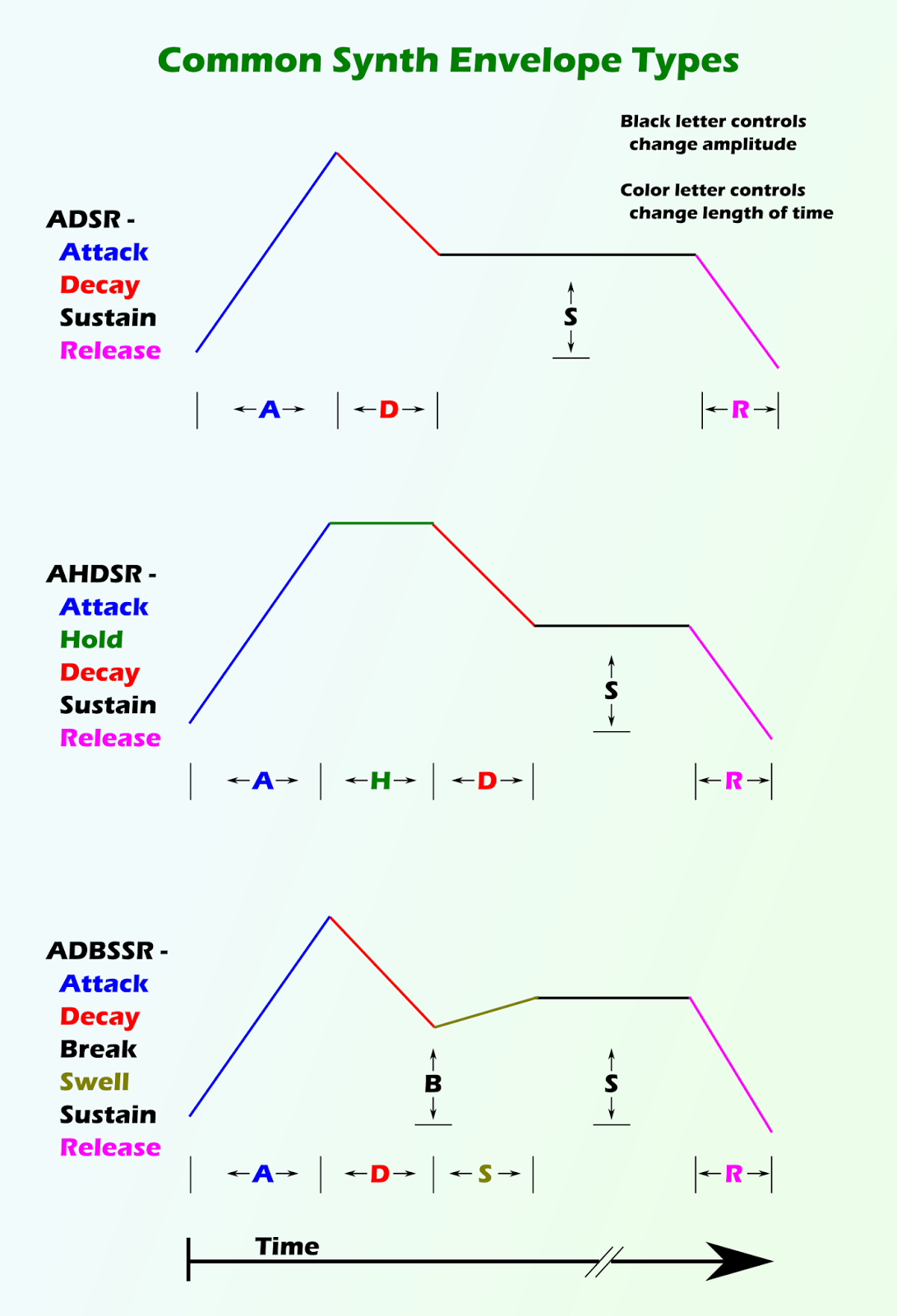
The term "infographic" seems like such a marketing buzzword it makes me want to ignore whomever says it. But I'm all for the presentation of information in a logical and clear manner. As I was pondering on how to increase interest in my audio plugins I thought about my ADBSSR envelopes that I love in the cellular automaton synth. I wanted some way to present quickly both how to use them and why they offer advantage over traditional ADSR envelope generators.They do add complexity but there's really no way to add a swell as we horn players do all the time to a patch without it. It even can look exactly like an ADHR when the Breakpoint is set to 1. Anyway I thought a diagram with explanatory text would do the trick. So I made one:

Figure 1: Not an infographic
This isn't an infographic though. I don't really know why I think that word is so stupid. Probably just because I tend to hate on anything trendy and hyped. Anyhow. Now you know how I feel. This image is in the public domain though I would appreciate citation.

Tuesday, November 11, 2014

FIX IS VERY SWEET!

One of my mission companions would say that a lot. He threatened (jokingly) to fix people. He was Tongan and barely spoke English or Filipino but we had fun and got some good work done.

Regardless of that, my Presonus Firebox had been making a strange whining sound for a while. I started a session a few weeks ago to finally begin a new song but (as usual) didn't get very far before fatherly duty called and the session sat for at least 2 weeks or so. This happens as regularly as I record which is roughly every few weeks. I eventually passed through the studio to grab something out of our food storage in the next room and realized that the firebox was completely dark. "Strange," I thought so I went and tried to restart JACK. The firebox wheezed and whined and eventually the blue LED slowly lit up. "Not good," I thought (I usually think very tersely), but I had to get that food upstairs and get dinner on for the kids.

Friday, October 24, 2014

My First Linux Audio Tutorial Video

I like that title. It makes me think of chunky toys and blocky characters with big eyes. But this is much less cute than my kids playthings: I made a video to introduce my infamous plugins. Here is the video. How I did it is below.
(if you can't see the embeded player here's the link: http://youtu.be/oHCPgh9HRAQ )
EDIT: The second one is done now too. See  http://youtu.be/izyf27eLPPA

Wednesday, September 10, 2014

Adding Blur in Cairo

I've made several widgets now that light up. I've worked around it mostly through gradients. Radial gradients are perfect for a circular LED. A linear gradient filling a carefully shaped path got me by for a square LED. But now I'm making an analog oscilloscope type widget, and a 7 segment LED and gradients aren't cutting it. If only you could do blur in Cairo.

Oh, but you can...

Tuesday, August 19, 2014

Making an LV2 plugin GUI (yes, in Inkscape)

Told you I'd be back.

So I made this pretty UI last post but I never really told you how to actually use it (I'm assuming you've read the previous 2 posts, this is the 3rd in the series). Since I'm "only a plugin developer," that's what I'm going to apply it to. Now I've been making audio plugins for longer than I can hold my breath, but I've never bothered to make one with a GUI. GUI coding seems so boring compared to DSP and it's so subjective (user: "that GUI is so unintuitive/natural/cluttered/inefficient/pretty/ugly/slow etc. etc....") and I actually like the idea of using your ears rather than a silly visual curve, but I can't deny, a pretty GUI does increase usership. Look at the Calf plugins...

Anyhow, regardless of whether its right or wrong I'm going to make GUIs (that are completely optional, you can always use the host generated UI). I think with the infamous cellular automaton synth I will actually be able to make it easier to use, so the GUI is justifiable, but other than that they're all eye candy, so why not make 'em sweet? So I'll draw them first, then worry about making them an actual UI. I've been trying to do this drawing-first strategy for years but once I started toying with svg2cairo I thought I might actually be able to do it this time. Actually as I'm writing this paragraph the ball is still up in the air, so it might not pan out, but I'm pretty confident by the time you read the last paragraph in this almost-tutorial I'll have a plugin with a GUI.

(*EDIT 14 Sept 2015 - a big mistake was pointed out to me in my LV2_UI instantiation, updated below).

So lets rip into it:

Monday, August 11, 2014

Drawing a GUI in Inkscape

So I got all excited and posted that last article about a lot of the technical stuff to make a GUI in Inkscape, but after posting it I realized it makes quite a few assumptions, so I'm going to add a few follow on posts, some of which (mostly this one) should have been written first. So its a prequel. Or a Part 0. Something like that.

Anyway the biggest assumption I made is that you are proficient in inkscape. Perhaps you are, but I wasn't until I started trying to draw GUIs in it. So basically all my skills are honed to this purpose. I'm not qualified to give a real inkscape tutorial so you should probably stop reading right now, but just in case I can help someone out there make a cool GUI I'll press onward.


Wednesday, July 30, 2014

Creating A GUI in Inkscape

Long time no post eh? Busy busy times. The roof of my house is naked and I'm trying to get it covered up, so not much free time. But I was trying this while waiting for a build at work. I still owe you dedicated reader(s) a discussion on some of the production techniques on my new song, but it will be a while.

Anyhow, I fiddled for a year or more with creating QT widgets that display svg drawings of primitives I draw in inkscape. I was trying to do this for rakarrack and at the time it was the best way I could reconcile my infantile GUI knowledge with my infantile art skills (inkscape is manageable for me. You just draw shapes. Its geometry!). I had moderate success, the widgets are functional, (and can be found in my infamous repository) but lacking some significant features, namely, due to QT, no floating point representation in dials. Also I have to manually create a file to dictate what primitive files are used and where they are placed in the window. The svg files are loaded at run time after this descriptor file is parsed allowing for anyone to customize the look, which is kinda cool, but not really necessary. In the end, it was over complicated, and I didn't really like working on it (why I haven't released a single program with a fancy stylized gui yet).

Enter AVTK.

Saturday, July 13, 2013

The Infamous Cellular Automaton Synth

It started with the obfuscated C competition... and a youtube video. Well, no it really started with learning about Conway's Game of Life. Err.. It started with a video about a 13 year old girl who was implementing Conway's Game of Life on the raspberry pi... Ahem. I became interested in cellular automata and especially linking it to music. I originally tried to emulate this one liner that was getting passed around on IRC:
echo "main(i){for(i=0;;i++)putchar(((i*(i>>8|i>>9)&46&i>>8))^(i&i>>13|i>>6));}" | gcc -x c - && ./a.out | aplay
I tried to implement my own version that used an automaton to do the same sort of thing (I'll let you scratch your head on what it does, or just copy and paste it into your terminal). It took me a while to get it working, but I eventually got an automaton operating successfully on a torus. I then went and obfuscated it thinking of entering it into the IOCC. It looks pretty good:
echo "main(_i_,i,_,i_i){i_i=30;for(i=7;;i=_i_<<1|_i_>>7) {_i_=0;for(_=0;_<8;_++)_i_|=((i_i&1<<((i>>_|i<<(1+~_&7))&7))>0) <<_;putchar(_i_);}}" | gcc -x c - && ./a.out | aplay
 
Got it? Simple enough. So where did I go with this?


Monday, June 17, 2013

First Impressions with LV2 Plugin Development (almost a tutorial)

Well, its been a while hasn't it? I'm actually done with my thesis. Done. Completo. Tapos na. Weird. Luckily I still have some publications from it to submit, otherwise I wouldn't have a single thing to put off. Except...we bought a  house, and it needs a new roof, and I should be working on that...

But I'm not. In fact, I've been pretty busy with trying to spend my time on unimportant things like synthesizers. I finally started writing one. It actually started when I found out someone was making LV2 midi filters that I'd been wanting to do for quite some time (to add "humanization" in Ardour 3 etc.) I contributed a  variant that used a normal distribution rather than a uniform one (using a modified Marsaglia polar method no less). Once I'd done that lv2 plugin it just broke down the wall and I felt like I could easily do a synth.